Wednesday, April 27, 2022

Checkbox, Radiobutton and ComboBox in PyQt6

This demo program shows how to create checkbox, radiobutton and combobox and place them at certain location in the window.

The output:


The Code:


  1
  2
  3
  4
  5
  6
  7
  8
  9
 10
 11
 12
 13
 14
 15
 16
 17
 18
 19
 20
 21
 22
 23
 24
 25
 26
 27
 28
 29
 30
 31
 32
 33
 34
 35
 36
 37
 38
 39
 40
 41
 42
 43
 44
 45
 46
 47
 48
 49
 50
 51
 52
 53
 54
 55
 56
 57
 58
 59
 60
 61
 62
 63
 64
 65
 66
 67
 68
 69
 70
 71
 72
 73
 74
 75
 76
 77
 78
 79
 80
 81
 82
 83
 84
 85
 86
 87
 88
 89
 90
 91
 92
 93
 94
 95
 96
 97
 98
 99
100
101
102
103
104
105
106
107
108
109
110
111
112
113
114
115
116
117
118
119
120
121
122
123
124
125
126
127
128
129
130
131
132
133
134
135
136
137
138
139
140
141
142
143
144
145
146
147
148
149
150
151
152
153
154
155
156
157
158
159
160
161
162
163
164
165
166
167
168
169
170
171
172
173
174
175
176
177
178
179
180
181
182
183
184
185
186
187
188
189
190
191
192
193
194
195
196
197
198
199
import sys
import os
from PyQt6.QtWidgets import QMainWindow, QApplication,  QWidget, QComboBox, QLineEdit, QLabel, QRadioButton, QButtonGroup, QCheckBox, QHBoxLayout, QVBoxLayout
from PyQt6 import QtCore, QtGui

class Window(QMainWindow):

    def __init__(self):
        super(Window, self).__init__()


        self.initUI()

    def initUI(self):
        self.setCentralWidget(QWidget(self))
        self.line_edit = QLineEdit(self)
        self.line_edit.setGeometry(25, 25, 150, 40)
        self.line_edit.setFocusPolicy(QtCore.Qt.FocusPolicy.StrongFocus)
        self.line_edit.setFocus()
        self.line_edit.setPlaceholderText('Enter Text Here')
        self.linelabel = QLabel('Entered Text Here', self)
        self.linelabel.setGeometry(25, 35, 180, 120)
        self.linelabel.setWordWrap(True)
        
        self.langs ={'c':0, 'cpp':0, 'java':0, 'python':0}
        
        self.checkBox_c = QCheckBox(self)
        self.checkBox_c.setGeometry(25, 155, 81, 20)
        self.checkBox_c.stateChanged.connect(self.checkedc)
          
        self.checkBox_cpp = QCheckBox(self)
        self.checkBox_cpp.setGeometry(116, 155, 81, 20)
        self.checkBox_cpp.stateChanged.connect(self.checkedcpp)
          
        self.checkBox_java = QCheckBox(self)
        self.checkBox_java.setGeometry(207, 155, 81, 20)
        self.checkBox_java.stateChanged.connect(self.checkedjava)
          
        self.checkBox_py = QCheckBox(self)
        self.checkBox_py.setGeometry(298, 155, 81, 20)
        self.checkBox_py.stateChanged.connect(self.checkedpy)
        
        self.checkBox_c.setText("C")
        self.checkBox_cpp.setText( "C++")
        self.checkBox_java.setText("Java")
        self.checkBox_py.setText("Python")
        
        self.clabel1 = QLabel(self)
        self.clabel1.setGeometry(25, 130, 200, 20)
        self.clabel1.setText("Select the Language you know:")


        self.radioButton_male = QRadioButton(self) 
        self.radioButton_male.setGeometry(45, 200, 81, 20)
        self.radioButton_male.toggled.connect(self.maleselected)
                
        self.radioButton_female = QRadioButton(self) 
        self.radioButton_female.setGeometry(45, 225, 81, 20)        
        self.radioButton_female.toggled.connect(self.femaleselected)
        
        self.radioButton_small = QRadioButton(self) 
        self.radioButton_small.setGeometry(215, 200, 81, 20)
        self.radioButton_small.toggled.connect(self.smallselected)
        self.radioButton_medium = QRadioButton(self)
        self.radioButton_medium.setGeometry(215, 225, 81, 20)        
        self.radioButton_medium.toggled.connect(self.mediumselected)         
        self.radioButton_large = QRadioButton(self)  
        self.radioButton_large.setGeometry(215, 245, 81, 20)
        self.radioButton_large.toggled.connect(self.largeselected)
        
        self.label = QLabel(self)
        self.label.setGeometry(45, 250, 150, 20)
        self.slabel = QLabel(self)
        self.slabel.setGeometry(215, 270, 150, 20)
        self.radioButton_male.setText("Male")
        self.label.setText("Select your gender:")
        self.radioButton_female.setText("Female")
        
        self.radioButton_small.setText("Small")
        self.radioButton_medium.setText("Medium")
        self.slabel.setText("Select your size:")
        self.radioButton_large.setText("Large")
        gender_group=QButtonGroup(self)
        size_group=QButtonGroup(self)


        gender_group.addButton(self.radioButton_male)
        gender_group.addButton(self.radioButton_female)
        
        size_group.addButton(self.radioButton_small)
        size_group.addButton(self.radioButton_medium)
        size_group.addButton(self.radioButton_large)
        
        
        self.combo_box = QComboBox(self)
        self.combo_box.setGeometry(125, 315, 120, 20)
        self.combo_box.addItem("Black")
        self.combo_box.addItem("Blue")
        self.combo_box.addItem("Brown")
        self.combo_box.addItem("Red")
        
        self.combo_box_label = QLabel(self)
        self.combo_box_label.setGeometry(25, 315, 100, 20)
        self.combo_box_label.setText("Select color:")
        self.combo_box_label_s = QLabel(self)
        self.combo_box_label_s.setGeometry(255, 315, 100, 20)
        self.line_edit.returnPressed.connect(lambda: self.do_action())
        self.combo_box.activated.connect(self.on_combobox_changed)
        self.setGeometry(25, 45, 400, 360)
        self.setWindowTitle('Post 26')
        self.show()
        
    def on_combobox_changed(self, value):
        print("combobox changed", value)
        self.combo_box_label_s.setText(self.combo_box.currentText())
    def mouseMoveEvent(self, e):

        x = int(e.position().x())
        y = int(e.position().y())

        #text = f'x: {x},  y: {y}'
        #self.linelabel.setText(text)
        self.line_edit.setFocus()
            
    def maleselected(self, selected):
        if selected:
            self.label.setText("You are male")
             
    def femaleselected(self, selected):
        if selected:
            self.label.setText("You are female")
            
    def smallselected(self, selected):
        if selected:
            self.slabel.setText("Your size is small")
             
    def mediumselected(self, selected):
        if selected:
            self.slabel.setText("Your size is medium")
    def largeselected(self, selected):
        if selected:
            self.slabel.setText("Your size is large")       
            
    def checkedc(self, checked):
        if checked:
            self.langs['c']= 1
        else:
            self.langs['c']= 0
        self.show1()
  
    def checkedcpp(self, checked):
        if checked:
            self.langs['cpp']= 1
        else:
            self.langs['cpp']= 0    
        self.show1()
              
    def checkedjava(self, checked):
        if checked:
            self.langs['java']= 1
        else:
            self.langs['java']= 0
        self.show1()
              
    def checkedpy(self, checked):
        if checked:
            self.langs['python']= 1
        else:
            self.langs['python']= 0
        self.show1() 
    
    def show1(self):
        checkedlangs =', '.join([key for key in self.langs.keys()
                                         if self.langs[key]== 1]) 
          
        # Updates message having list of all selected languages. 
        self.clabel1.setText("You know "+checkedlangs)
    def do_action(self):

        value = self.line_edit.text()
        self.linelabel.setText(value)


def main():

    app = QApplication(sys.argv)
    ex = Window()
    ex.show()
    sys.exit(app.exec())


if __name__ == '__main__':
    main()

Saturday, April 23, 2022

Upgrade 01: PyQt6 Desktop App Template

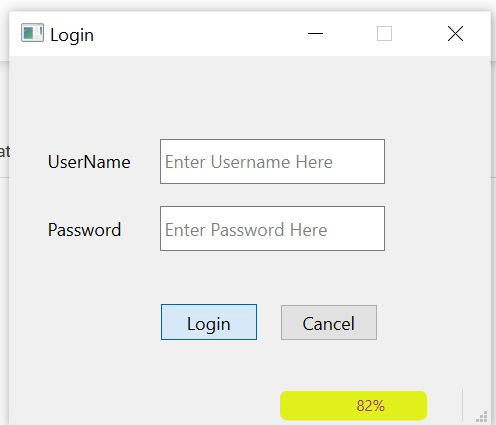
This demo program shows another way to implement the Desktop App Template using modularized approach(I created the import.py to handle import common libraries of the the window files(splash, login, mainw), a sidebar menu has been added which is from the previous post "Create Treeview with PyQt6" and I added a progress bar at the newly added status of the login screen of which code is derrived from my previous post "Progressbar with PyQt6".  If you prefer the old version you may still access it with the original post.

The Output:


The Code

imports.py:

 1
 2
 3
 4
 5
 6
 7
 8
 9
10
import PyQt6.QtWidgets   as a
import PyQt6.QtCore as f
import PyQt6.QtGui as g
import PyQt6 as p
import sys as s
import os as o
import time as t
__all__ = [
    'a', 'f', 'g', 'p', 's', 'o', 't'
]


splash.py:

  1
  2
  3
  4
  5
  6
  7
  8
  9
 10
 11
 12
 13
 14
 15
 16
 17
 18
 19
 20
 21
 22
 23
 24
 25
 26
 27
 28
 29
 30
 31
 32
 33
 34
 35
 36
 37
 38
 39
 40
 41
 42
 43
 44
 45
 46
 47
 48
 49
 50
 51
 52
 53
 54
 55
 56
 57
 58
 59
 60
 61
 62
 63
 64
 65
 66
 67
 68
 69
 70
 71
 72
 73
 74
 75
 76
 77
 78
 79
 80
 81
 82
 83
 84
 85
 86
 87
 88
 89
 90
 91
 92
 93
 94
 95
 96
 97
 98
 99
100
101
102
from imports import *
from login import WindowApp
class SplashScreen(a.QWidget):
    def __init__(self, parent=None):
        super().__init__()
        self.setFixedSize(700, 350)
        self.setWindowFlag(f.Qt.WindowType.FramelessWindowHint)
        self.setAttribute(f.Qt.WidgetAttribute.WA_TranslucentBackground)
        self.counter = 0
        self.n = 100 
        self.initUI()
        self.timer = f.QTimer()
        self.timer.timeout.connect(self.loading)
        self.timer.start(30)
    def initUI(self):
        # layout to display splash scrren frame
        layout = a.QVBoxLayout()
        self.setLayout(layout)
        # splash screen frame
        self.frame = a.QFrame()
        layout.addWidget(self.frame)
        # splash screen title
        self.title_label = a.QLabel(self.frame)
        self.title_label.setObjectName('title_label')
        self.title_label.resize(690, 120)
        self.title_label.move(0, 5) # x, y
        self.title_label.setText('Your World Famous App')
        self.title_label.setAlignment(f.Qt.AlignmentFlag.AlignCenter)
        # splash screen title description
        self.description_label = a.QLabel(self.frame)
        self.description_label.resize(690, 40)
        self.description_label.move(0, self.title_label.height())
        self.description_label.setObjectName('desc_label')
        self.description_label.setText('<b>We build the systems and the apps.</b>')
        self.description_label.setAlignment(f.Qt.AlignmentFlag.AlignCenter)
        # splash screen pogressbar
        self.progressBar = a.QProgressBar(self.frame)
        self.progressBar.resize(self.width() - 200 - 10, 50)
        self.progressBar.move(100, 180) # self.description_label.y()+130
        self.progressBar.setAlignment(f.Qt.AlignmentFlag.AlignCenter)
        self.progressBar.setFormat('%p%')
        self.progressBar.setTextVisible(True)
        self.progressBar.setRange(0, self.n)
        self.progressBar.setValue(20)
        self.progressBar.setStyleSheet("""QProgressBar {
            background-color: #000000;
            color: #9B2F6A;
            border-style: none;
            border-radius: 5px;
            text-align: center;
            font-size: 25px;
        }
        QProgressBar::chunk {
            border-radius: 7px;
            background-color: qlineargradient(spread:pad x1:0, x2:1, y1:0.511364, y2:0.523, stop:0 #E1F01A);
        }""")
        # spash screen loading label
        self.loading_label = a.QLabel(self.frame)
        self.loading_label.resize(self.width() - 10, 50)
        self.loading_label.move(0, self.progressBar.y() + 70)
        self.loading_label.setObjectName('loading_label')
        self.loading_label.setAlignment(f.Qt.AlignmentFlag.AlignCenter)
        self.loading_label.setText('Loading...')
    def loading(self):
        # set progressbar value
        self.progressBar.setValue(self.counter)
        # stop progress if counter
        # is greater than n and
        # display main window app
        if self.counter >= self.n:
            self.timer.stop()
            self.close()
            t.sleep(1)
            self.showLogin()
        self.counter += 1
    def showLogin(self):
        self.login = WindowApp(self)
        self.login.show()    

if __name__ == "__main__":       
    app = a.QApplication(s.argv)
    app.setStyleSheet('''
        #title_label {
            font-size: 50px;
            color: #F0B21A;
        }
        #desc_label {
            font-size: 15px;
            color: #F0B21A;
        }
        #loading_label {
            font-size: 20px;
            color: #F0B21A;
        }
        QFrame {
            background-color: #2F339B;
            color: #c8c8c8;
        }
    ''')
    splash = SplashScreen()
    splash.show()
    s.exit(app.exec())


login.py:

  1
  2
  3
  4
  5
  6
  7
  8
  9
 10
 11
 12
 13
 14
 15
 16
 17
 18
 19
 20
 21
 22
 23
 24
 25
 26
 27
 28
 29
 30
 31
 32
 33
 34
 35
 36
 37
 38
 39
 40
 41
 42
 43
 44
 45
 46
 47
 48
 49
 50
 51
 52
 53
 54
 55
 56
 57
 58
 59
 60
 61
 62
 63
 64
 65
 66
 67
 68
 69
 70
 71
 72
 73
 74
 75
 76
 77
 78
 79
 80
 81
 82
 83
 84
 85
 86
 87
 88
 89
 90
 91
 92
 93
 94
 95
 96
 97
 98
 99
100
101
102
from imports import *
from mainw import Window2

TIME_LIMIT = 100
class WindowApp(a.QMainWindow):
    def __init__(self, parent=None):
        super().__init__()
        self.setWindowTitle("Login")
        self.setFixedSize(320, 245)
        self.quit = g.QAction("Quit", self)
        self.quit.triggered.connect(self.closeEvent)
        self.move(400, 200) 
        lblusr =  a.QLabel('UserName', self)
        lblusr.setStyleSheet('QLabel {background-color: transparent; color: black;}')
        lblusr.setGeometry(25, 55, 100, 30) 
        txtusr = a.QLineEdit('', self) 
        txtusr.setGeometry(100, 55, 150, 30)  
        lblpwd =  a.QLabel('Password', self)
        lblpwd.setStyleSheet('QLabel {background-color: transparent; color: black;}')
        lblpwd.setGeometry(25, 100, 100, 30) 
        txtpwd = a.QLineEdit('', self) 
        txtusr.setPlaceholderText("Enter Username Here")
        txtpwd.setPlaceholderText("Enter Password Here")
        txtpwd.setGeometry(100, 100, 150, 30) 
        txtpwd.setEchoMode(a.QLineEdit.EchoMode.Password)        
        pblogin = a.QPushButton('Login', self)
        pblogin.setGeometry(100, 165, 65, 25)
        pblogin.clicked.connect(self.onClick_pb3)  
        pbcanc = a.QPushButton('Cancel', self)
        pbcanc.setGeometry(180, 165, 65, 25)
        pbcanc.clicked.connect(self.onClick_pb4)  
        self.statusBar = a.QStatusBar()
        self.setStatusBar(self.statusBar)
        self.statusBar.showMessage("Ready", 5000)        
        #self.show()
        
        self.progressBar = a.QProgressBar()
        self.progressBar.setStyleSheet("""QProgressBar {
            background-color: transparent;
            color: #9B2F6A;
            border-style: none;
            border-radius: 5px;
            text-align: center;
            font-size: 10px;
        }
        QProgressBar::chunk {
            border-radius: 5px;
            background-color: qlineargradient(spread:pad x1:0, x2:1, y1:0.511364, y2:0.523, stop:0 #E1F01A);
        }""")
        self.statusBar.addPermanentWidget(self.progressBar)
        self.progressBar.move(30, 40)
        self.progressBar.setFixedSize(120, 20)
        #self.progressBar.setValue(100)
    def closeEvent(self, event):
        close = a.QMessageBox()
        close.setIcon(a.QMessageBox.Icon.Question)
        close.setWindowTitle('Pls confirm')
        close.setStyleSheet('QLabel {background-color: transparent; color: black;}')
        close.setText("Do you really want to quit?")
        close.setStandardButtons(a.QMessageBox.StandardButton.Yes | a.QMessageBox.StandardButton.Cancel)
        close = close.exec()

        if close == a.QMessageBox.StandardButton.Yes:
            event.accept()
        else:
            event.ignore()
    def onClick_pb3(self):
        count = 0
        while count < TIME_LIMIT:
            count += 1
            t.sleep(0.01)
            self.progressBar.setValue(count)
        self.showWindow2()
        #self.w = Window2()       
        #self.w.show()
        self.hide()
    def showWindow2(self):
        self.mdiwindow = Window2()
        self.mdiwindow.show()
    def onClick_pb4(self):
        self.quit 
        self.close()    
          
if __name__ == "__main__":       
    app = a.QApplication(s.argv)
    app.setStyleSheet('''        
        QProgressBar {
            background-color: #000000;
            color: #9B2F6A;
            border-style: none;
            border-radius: 4px;
            text-align: center;
            font-size: 10px;
        }
        QProgressBar::chunk {
            border-radius: 4px;
            background-color: qlineargradient(spread:pad x1:0, x2:1, y1:0.511364, y2:0.523, stop:0 #E1F01A);
        }
    ''')
    splash = WindowApp()
    splash.show()
    s.exit(app.exec())

mainw.py:

  1
  2
  3
  4
  5
  6
  7
  8
  9
 10
 11
 12
 13
 14
 15
 16
 17
 18
 19
 20
 21
 22
 23
 24
 25
 26
 27
 28
 29
 30
 31
 32
 33
 34
 35
 36
 37
 38
 39
 40
 41
 42
 43
 44
 45
 46
 47
 48
 49
 50
 51
 52
 53
 54
 55
 56
 57
 58
 59
 60
 61
 62
 63
 64
 65
 66
 67
 68
 69
 70
 71
 72
 73
 74
 75
 76
 77
 78
 79
 80
 81
 82
 83
 84
 85
 86
 87
 88
 89
 90
 91
 92
 93
 94
 95
 96
 97
 98
 99
100
101
102
103
104
105
106
107
108
109
110
111
112
113
114
115
116
117
118
119
120
121
122
123
124
125
126
127
128
129
130
131
132
133
134
135
136
137
138
139
140
141
142
143
144
145
146
147
148
149
150
151
152
153
154
155
156
157
158
159
160
161
162
163
164
165
166
167
168
169
170
171
172
173
174
175
176
177
178
179
180
181
182
183
184
185
186
187
188
189
190
191
192
193
194
195
196
197
198
199
200
201
202
203
204
205
206
207
208
209
210
211
212
213
214
215
216
217
218
from imports import *
x_init = 0
class StandardItem(g.QStandardItem):
    def __init__(self, txt='', font_size=12, set_bold=False, color=g.QColor(0, 0, 0), color1=g.QColor(0, 0, 0)):
        super().__init__()

        fnt = g.QFont('Open Sans', font_size)
        fnt.setBold(set_bold)

        self.setEditable(False)
        self.setForeground(color)
        self.setBackground(color1)
        self.setFont(fnt)
        self.setText(txt)
class Window2(a.QMainWindow):                          
    count = 0
    def __init__(self):
        super().__init__()
        self.installEventFilter(self)
        self.quit = g.QAction("Quit", self)
        self.quit.triggered.connect(self.closeEvent)
        self.mdi = a.QMdiArea()
        self.treeView = a.QTreeView()
        self.treeView.setHeaderHidden(True)

        treeModel = g.QStandardItemModel()
        rootNode = treeModel.invisibleRootItem()
        america = StandardItem('Accounting', 12, set_bold=True, color1=g.QColor('#4d88ff'))

        california = StandardItem(' Accounts Payable', 10, color1=g.QColor('#80aaff'))
        america.appendRow(california)

        oakland = StandardItem('   Vendors', 8, color=g.QColor('#3939ac'), color1=g.QColor('#b3ccff'))
        sanfrancisco = StandardItem('   Incoming Invoice', 8, color=g.QColor('#3939ac'), color1=g.QColor('#b3ccff'))
        sanjose = StandardItem('   Purchases', 8, color=g.QColor('#3939ac'), color1=g.QColor('#b3ccff'))

        california.appendRow(oakland)
        california.appendRow(sanfrancisco)
        california.appendRow(sanjose)


        texas = StandardItem(' Accounts Receivable', 10, color1=g.QColor('#80aaff'))
        america.appendRow(texas)

        austin = StandardItem('   Customers', 8, color=g.QColor('#3939ac'), color1=g.QColor('#b3ccff'))
        houston = StandardItem('   Outbound Invoices', 8, color=g.QColor('#3939ac'), color1=g.QColor('#b3ccff'))
        cali = StandardItem('   Dunning', 8, color=g.QColor('#3939ac'), color1=g.QColor('#b3ccff'))
        dallas = StandardItem('   Sales', 8, color=g.QColor('#3939ac'), color1=g.QColor('#b3ccff'))

        texas.appendRow(austin)
        texas.appendRow(houston)
        texas.appendRow(cali)
        texas.appendRow(dallas)


        # Canada 
        canada = StandardItem('Logistics', 12, set_bold=True, color1=g.QColor('#4d88ff'))

        alberta = StandardItem(' Inventory', 10, color1=g.QColor('#80aaff'))
        bc = StandardItem(' Materials', 10, color1=g.QColor('#80aaff'))
        ontario = StandardItem(' Deliveries', 10, color1=g.QColor('#80aaff'))
        canada.appendRows([alberta, bc, ontario])


        rootNode.appendRow(america)
        rootNode.appendRow(canada)

        self.treeView.setModel(treeModel)
        self.treeView.expandAll()
        self.treeView.doubleClicked.connect(self.getValue)
        self.treeView.setIndentation(0)
        self.treeView.setAlternatingRowColors(True)
        self.treeView.setFixedSize(160,self.height()-25)
        self.setCentralWidget(a.QWidget(self))
        windowLayout = a.QHBoxLayout(self)
        windowLayout.addWidget(self.treeView, alignment=f.Qt.AlignmentFlag.AlignTop)
        windowLayout.addWidget(self.mdi, alignment=f.Qt.AlignmentFlag.AlignTop)
        self.centralWidget().setLayout(windowLayout)
        #self.setCentralWidget(self.mdi)
        
        self.toolbar = a.QToolBar("Documents")
        self.toolbar.setMovable(False)
        toolbar1 = a.QToolBar("Messages")
        self.toolbar.setIconSize(f.QSize(30,30))
        toolbar1.setIconSize(f.QSize(30,30))
        self.addToolBar(self.toolbar)
        
        self.new_action = g.QAction(g.QIcon(r"c:\crud\icons\document--plus.png"), "&New", self)
        self.new_action.setStatusTip("New Document")
        self.new_action.triggered.connect(self.onNewClick)
        #button_action.setCheckable(True)
        self.new_action.setShortcut(g.QKeySequence("Ctrl+p"))
      
        chg_action = g.QAction(g.QIcon(r"c:\crud\icons\document--pencil.png"), "&Change", self)
        chg_action.setStatusTip("Change Document")
        chg_action.triggered.connect(self.onClick)
        chg_action.setCheckable(True)
        self.toolbar.addAction(self.new_action)
        self.toolbar.addAction(chg_action)       
        
        self.addToolBar(toolbar1)
        inbox_action = g.QAction(g.QIcon(r"c:\crud\icons\inbox--plus.png"), "&Add Message", self)
        inbox_action.setStatusTip("Add Message")
        inbox_action.triggered.connect(self.onClick)
        inbox_action.setCheckable(True)
        inbox_action.setShortcut(g.QKeySequence("Ctrl+m"))
        inbox_action1 = g.QAction(g.QIcon(r"c:\crud\icons\inbox--minus.png"), "&Remove Message", self)
        inbox_action1.setStatusTip("Remove Message")
        inbox_action1.triggered.connect(self.onClick)
        inbox_action1.setCheckable(True)
        inbox_action1.setShortcut(g.QKeySequence("Ctrl+n"))
        exit_action = g.QAction(g.QIcon(r"c:\crud\icons\door-open-out.png"), "&Exit", self)
        exit_action.setStatusTip("Exit")
        exit_action.triggered.connect(self.onExitClick)
        exit_action.setShortcut(g.QKeySequence("Ctrl+x"))
        toolbar1.addAction(inbox_action)
        toolbar1.addAction(inbox_action1)
        
        self.statusBar = a.QStatusBar()
        self.setStatusBar(self.statusBar)
        self.statusBar.showMessage("Ready", 3000)
        menu = self.menuBar()

        file_menu = menu.addMenu("&File")
        file_menu.addAction(self.new_action)
        file_menu.addAction(chg_action)
        file_menu.addSeparator()
        file_submenu = file_menu.addMenu("Messages")
        file_submenu.addAction(inbox_action)
        file_submenu.addAction(inbox_action1)
        file_menu.addSeparator()
        file_menu.addAction(exit_action)
        bar = self.menuBar()
		
        file = bar.addMenu("Window")
        file.addAction("Cascade")
        file.addAction("Tile")
        file.triggered[g.QAction].connect(self.click)
        
        tb = bar.addMenu("Toolbar")
        tb.addAction("Hide Documents Toolbar")
        tb.addAction("Unhide Documents Toolbar")
        tb.triggered[g.QAction].connect(self.click)
        tb1 = bar.addMenu("System")
        tb1.addAction("About This Template")
        tb1.triggered[g.QAction].connect(self.about)
        self.setGeometry(125,75,850,350)
        #windowLayout = QVBoxLayout(self)
        #windowLayout.addWidget(self.mdi, alignment=Qt.AlignmentFlag.AlignTop)
        self.setWindowTitle("The App System") 
    def resizeEvent(self, event):
                  
           self.treeView.setFixedSize(160,self.height()-102)
              
    def closeEvent(self, event):
        close = a.QMessageBox()
        close.setIcon(a.QMessageBox.Icon.Question)
        close.setWindowTitle('Pls confirm')
        close.setStyleSheet('QLabel {background-color: transparent; color: black;}')
        close.setText("Do you really want to quit?")
        close.setStandardButtons(a.QMessageBox.StandardButton.Yes | a.QMessageBox.StandardButton.Cancel)
        close = close.exec()

        if close == a.QMessageBox.StandardButton.Yes:
            event.accept()
        else:
            event.ignore()
    def getValue(self, val):
        print(val.data())
        print(val.row())
        print(val.column())
    def contextMenuEvent(self, event):
        menu = a.QMenu(self)
        menu.addAction(self.new_action)
        menu.exec(event.globalPos())        
    def onClick(self, s):
        print("click",s) 
    def onExitClick(self, s):
        self.quit 
        self.close()  
    def about(self, s):
        aboutm = a.QMessageBox()
        aboutm.setIcon(a.QMessageBox.Icon.Information)
        aboutm.setWindowTitle('Software Information')
        aboutm.setStyleSheet('QLabel {background-color: transparent; color: black;}')
        aboutm.setText("Title: Simple App Template \n Version: 1.00 \n Release Date: April 19, 2022")
        aboutm.setStandardButtons(a.QMessageBox.StandardButton.Ok)
        aboutm = aboutm.exec()         
    def onNewClick(self, s):       
        Window2.count = Window2.count+1
        sub = a.QMdiSubWindow()
        lbl1a =  a.QLabel('RECS', sub)
        lbl1a.setGeometry(25, 75, 50, 35)
        lbl1a.setStyleSheet('QLabel {background-color: #0E95A6; color: #d4d4d4;}')
        lbl1a.setAlignment(f.Qt.AlignmentFlag.AlignCenter)
        sub.setGeometry(25, 25, 200, 200)
        sub.setWindowTitle("subwindow"+str(Window2.count))
        self.mdi.addSubWindow(sub)
        sub.show()
    def click(self, q):                  
        if q.text() == "Cascade":
          self.mdi.cascadeSubWindows()
                    
        if q.text() == "Tile":
          self.mdi.tileSubWindows() 
          
        if q.text() == "Hide Documents Toolbar":
          self.toolbar.toggleViewAction().setChecked(True)
          self.toolbar.toggleViewAction().trigger() 
        if q.text() == "Unhide Documents Toolbar":
          self.toolbar.toggleViewAction().setChecked(False)
          self.toolbar.toggleViewAction().trigger()          
if __name__ == "__main__":       
    app = a.QApplication(s.argv)
 
    splash = Window2()
    splash.show()
    s.exit(app.exec())